
Understand AI Credits and What Each AI Tool Costs
See what AI credits pay for, what each AI tool typically uses, how far the monthly allowance goes, and how the balance is topped up.
The Pro AI toolkit draws on one balance of AI credits. Each run is charged for the AI work it actually does, so a bigger case, longer notes or a longer recording uses more. Searching, reading and repertorizing never use credits.
Before you start
AI credits come with Pro. A monthly plan adds 100 credits with each monthly payment, an annual plan 1,200 with each yearly payment, and a 3-year plan 3,600. Lifetime Pro and student plans include 1,000 credits once. The AI tools also need AI processing consent.
Free has no AI credits. Semantic repertory search on Free never uses them.
What uses credits
The AI toolkit uses credits: AI Analysis, Similia AI, Notes to Rubrics, Analyze Photo, Upload Notes and Scan handwriting, Upload Recording and Dictate, Live Audio Mode, Update with AI on the case timeline, and AI transcription and handwriting in provings, which are charged to the proving's organiser.
These never use credits: keyword and semantic repertory search (quality ranking included), materia medica search and reading, repertorization, case management, and the materia medica findings shown during Live Audio.
What each tool typically costs
Rounded figures in credits, from real use in October 2026 and test runs in November 2026:
| Tool | Charged per | Typical credits |
|---|---|---|
| AI Analysis | Analysis | 4 to 7, about 5 on average |
| Similia AI | Answer | About 0.5, up to about 1.5 |
| Notes to Rubrics, Standard | Run | 1 to 3 |
| Notes to Rubrics, Advanced | Run | 3 to 12 |
| Analyze Photo | Photo | Under 0.1, plus a Notes to Rubrics run on what the photo shows |
| Upload Notes, Scan handwriting | Image or page | Under 0.1 |
| Upload Recording, Dictate | Hour of audio | About 4.6, or 5.0 with Extract patient's words only |
| Live Audio Mode, Transcribe only | Hour | About 4.6 |
| Live Audio Mode, Transcribe + AI analysis | Hour | 10 to 13 |
| Update with AI | Consultation | About 0.3, a few credits for a very long one |
What 100 credits a month covers
On its own, 100 credits pays for about 20 AI analyses, about 180 Similia AI answers, or about 9 hours of Live Audio with AI analysis (over 20 hours of transcription only). A busy month with 8 AI analyses (about 40 credits), 2 hours of Live Audio with AI analysis (about 23), 30 Similia AI answers (about 15) and Notes to Rubrics on 10 cases (about 20) uses about 98.
Most practitioners use far less. In October 2026, half of the practitioners who used an AI tool spent 11 credits or fewer in the month, three in four spent 31 or fewer, and nine in ten spent 70 or fewer.
How the balance is topped up
There is one balance. A renewal adds to it, so unused credits carry over, and credits from packs never expire.
- Monthly plan: 100 credits with each monthly payment. A free trial starts with 100 credits, which are the first month's allowance, so the first payment adds none and the second adds 100.
- Annual and 3-year plans: 1,200 or 3,600 credits with each payment. After a free trial, the first payment adds 1,100 or 3,500 to the trial's 100.
- Lifetime Pro and student plans: 1,000 credits once, with no monthly allowance.
- Credit packs: 200, 500 or 1,000 credits, for any account with Pro access.
Check your balance and history
- Open the account menu. AI Credits shows the balance.
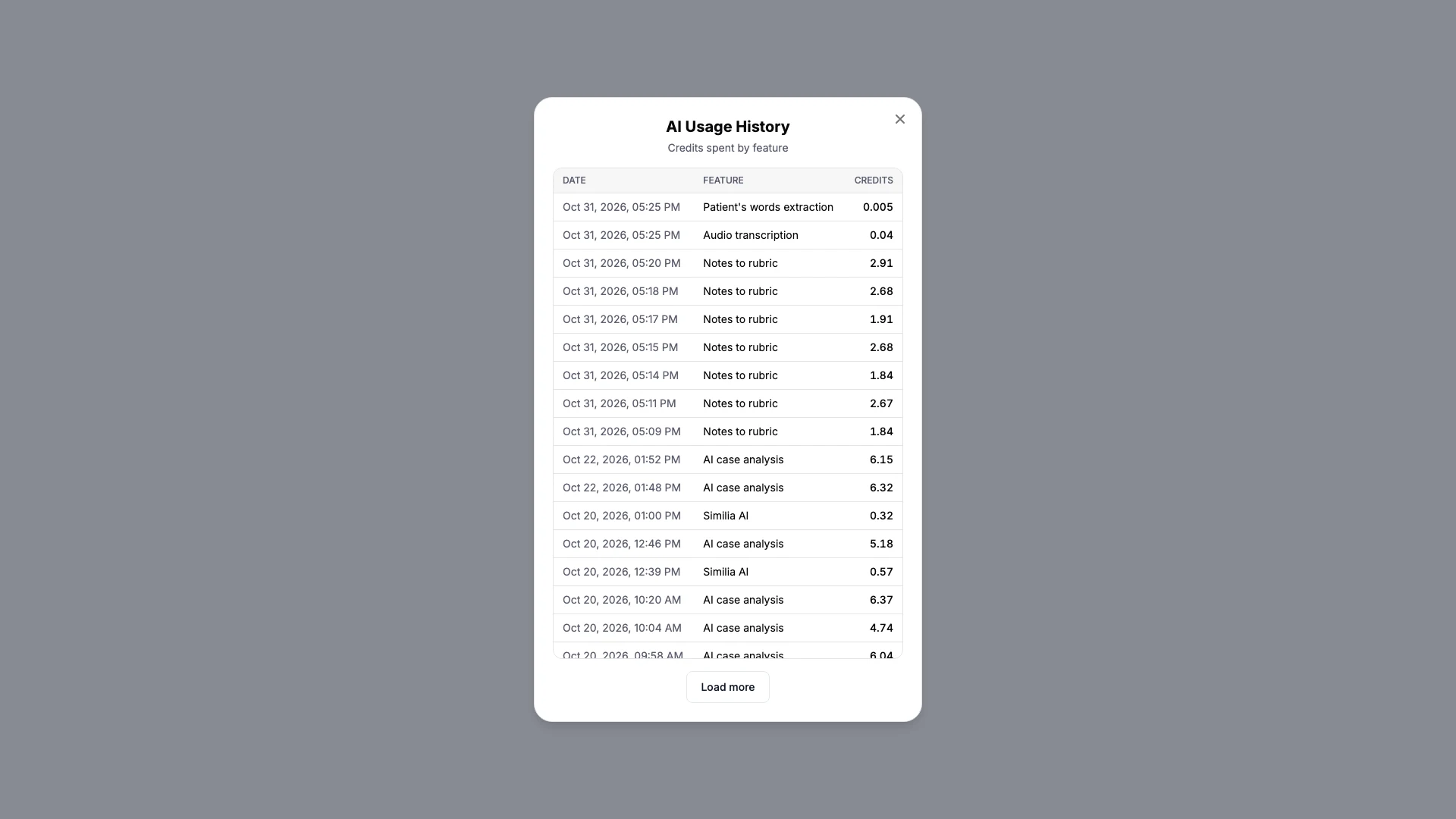
- Choose History to open AI Usage History, which lists the date, the feature and the credits of each charge.
- Choose How AI credits work for a short summary.
Check the estimate before a run
- Read the estimate before you start. AI Analysis shows a typical cost in its options, Notes to Rubrics an estimate for the notes it will read, Upload Recording an estimate for the file, and Live Audio Mode a typical cost per hour for the mode chosen.
Add credits
- Open Shop and scroll to AI credits, or choose Buy more in the account menu.
- Choose a pack and complete the purchase in Stripe checkout. The credits are added once the payment completes.
When the balance runs low
A run that has started always finishes, even if it takes the balance below zero; the next renewal or pack is added to what is left. With a balance of zero or less, the AI tools ask for more credits before they start, and AI Analysis needs at least 4 credits.
A failed AI analysis, one that finds no remedies to suggest, and a failed Similia AI answer are not charged. Notes to Rubrics is charged once it finishes, even when no rubric fits, and a recording is charged for its minutes even when it turns out to hold no speech. Deleting an analysis does not refund it.
What you should see
AI Usage History lists each charge, newest first, with its date, feature and credits. Renewals and purchases are not listed there.
If something looks wrong
- If only 100 credits arrived after the first monthly payment, the trial's 100 credits were that month's allowance; the next 100 arrive with the second payment.
- If an AI tool asks for credits while the balance shows some, check the amount: AI Analysis needs at least 4.
- If a charge looks high, open AI Usage History to see what each run used. Long notes, long recordings and big cases use more.
- If purchased credits have not appeared, refresh the page after checkout. If they still have not appeared after a few minutes, contact support.