
Start HereAvailabilityFree
Create Your First Case and Analysis
Create a case, add an analysis, and save your first rubrics without losing your place.
This guide takes you from an empty case list to a saved analysis. Use made-up information while you are learning.
Before you start
Free accounts can create three new cases and three new analyses each month. Pro accounts can create unlimited cases and analyses. Creating a practice case uses one of those monthly Free slots.
Create the case
- Open Cases.
- Select the action for creating a case. If Similia asks how you will use it, choose Study material for fictional examples. Choose Patient information and accept the Data Processing Agreement before adding identifiable patient information. Acceptance is saved once for the account and named practitioner or organisation, not for every new case.
- Complete the case form with a fictional name and basic details.
- Save the case.
- Open the new case.
- Select the action for creating an analysis.
- Give the analysis a short name that describes the consultation.
- Add one or two verified rubrics from Repertory search.
What you should see
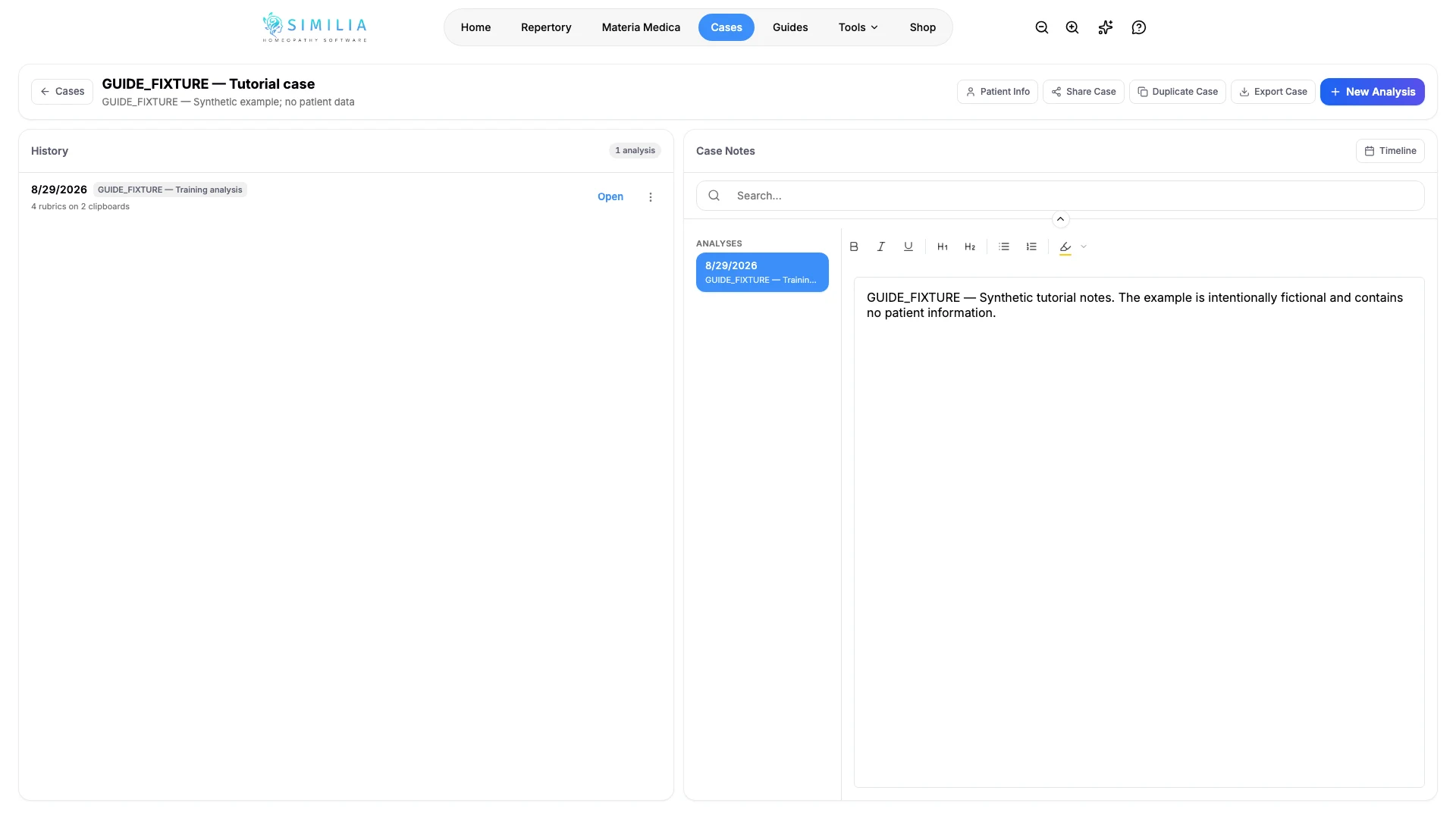
Your case page shows the saved analysis. Opening it again restores its rubrics and analysis results.
If something looks wrong
- If the create action opens an upgrade message, the Free monthly case or analysis limit may already be used.
- If your case is missing, clear the case-list search and check the current folder.
- If no remedies appear, add at least one rubric that contains remedies.