
Explore the Plants Table
Follow Jan Scholten's plant code through three tables — phylum and class, subclass and phase, phase and subphase — down to the families, their remedies by stage and the chapters behind every position.
The Plants Table shows Jan Scholten's classification of the plant kingdom, the sibling of the Periodic Table. Scholten's plant code has three series before the phases: the phylum, the class and the subclass. The page follows them as three tables. The kingdom table places every class at its phylum and series. Opening a class shows its subclasses in rows and the phases in columns, with the order at each position. Opening a subclass shows Scholten's grid of phases and subphases with the families of that subclass in the cells. Every family holds its remedies by stage, and every heading opens the matching chapter from Scholten's catalogue.
Before you start
The Plants Table requires Pro. This guide explains the controls, not a clinical method or the meaning of a series, phase, subphase or stage.
Explore the table
- Go to Scholten Tables in Tools and select Plants Table at the top of the page. Select Periodic Table to return to the mineral table.
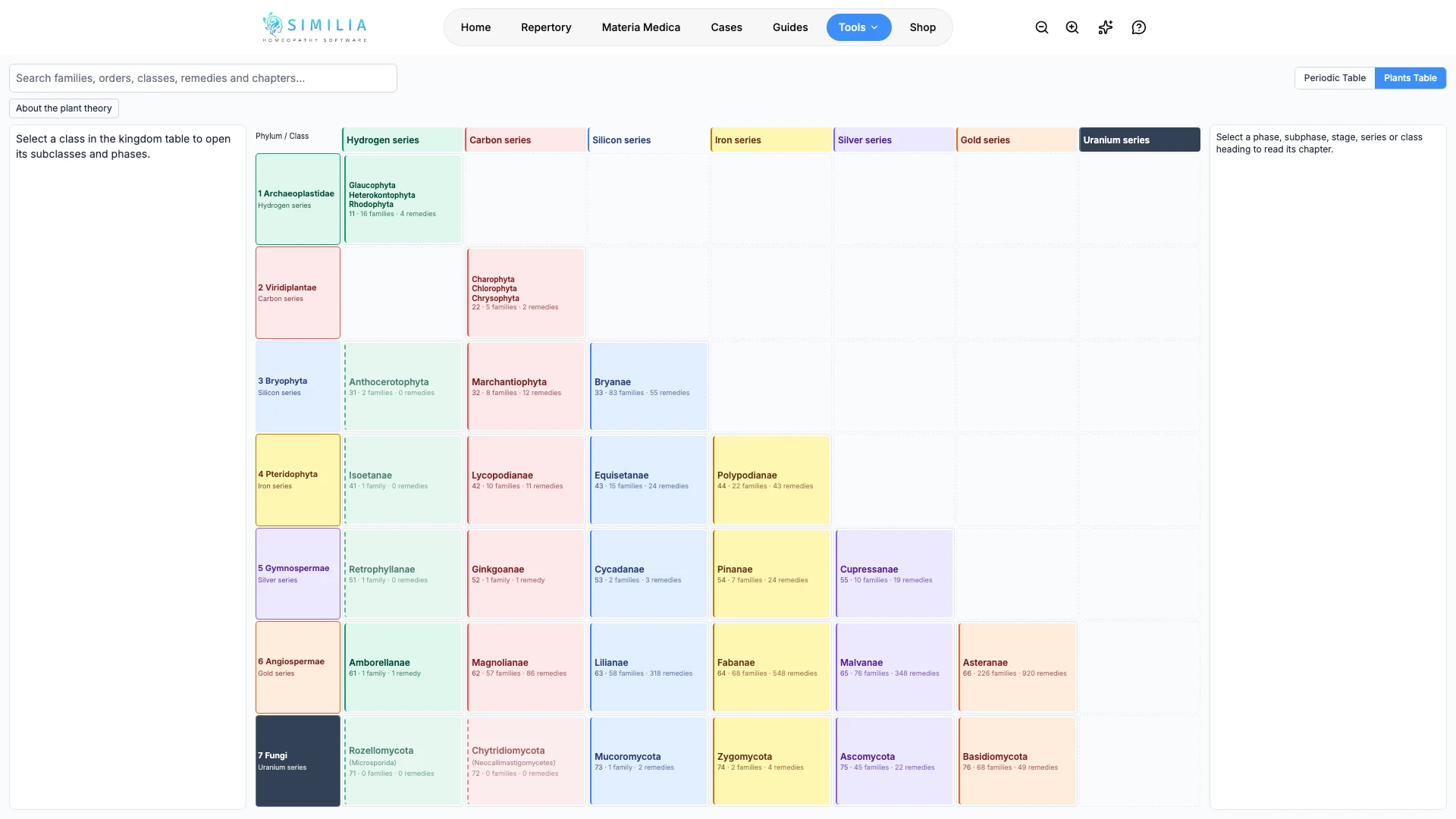
- Read the kingdom table: phyla run down the side, the seven series across the top. Each occupied cell names the class at that position with its Scholten code, families and remedies. A dashed cell holds a class that Scholten records but that has no remedy in the catalogue yet; a cell that names several classes is a position they share. Select a class to open it.
- Read the class table: subclasses run down the side by series, and the phases run across the top. Each cell names the order at that subclass and phase. Select a subclass row to open its grid, or select an order cell to open the same grid with that phase highlighted.
- Read the subclass grid: phases run down the side, each labelled with its code and order, and subphases run across the top. Each cell holds the families at that position. While no family is selected, selecting a phase row shows that order and its chapter in the panel beside the grid. Select All classes to return to the kingdom table, or the class chip in the breadcrumb to return to the class table.
- Select a family cell. The panel beside the grid shows its classification through all three series, its Scholten chapter and, below the grid, its remedies laid out by stage.
- Open a remedy from the stage strip to read it in the materia medica. The browser's Back button returns to the same table, family, heading and search. A remedy shown with a dashed border has no chapter in a book available to the account.
- Select a phase, subphase or stage number, a series heading, a phylum, class, subclass or order name, or About the plant theory to read that chapter in the panel on the other side. The selected family stays open. When several classes share one position, the panel lists the other chapters of that position.
- Search a family, order, class, remedy or chapter word. Matching families are highlighted in the grid, and the class and order cells show how many of their families match.
What you should see
Codes follow Scholten's notation: a phylum such as Angiospermae is 6, a class such as Asteranae is 66 (phylum 6, series 6), a subclass such as Lamiidae is 665, an order such as Solanales is 665.7, a family such as Atropoideae is 665.71, and a remedy such as Belladonna is 665.71.06, where 6 is its stage. Scholten's code also has a neutral position 0 at every level; a 0 row or column appears, without a series colour, only where the catalogue places a remedy on it — as in the brown algae, whose Fucaceae sit at 110.00. Colours distinguish series in the interface; the palette is a design choice, not a classification supplied by Scholten. Families shown dimmed with a dashed border have a chapter but no remedy in the catalogue.
The address bar follows the position — class, subclass, family, open heading and search — so a link to it opens the same table for anyone with access.
Chapter links name the book — Jan Scholten's Qjure or Wonderful Plants — and open the original chapter in English. When a family has no chapter of its own, the chapter of the nearest parent — its family, order, subclass, class or phylum — is shown and the panel says so. Species that Scholten classifies but that have no entry in the catalogue's books appear without a link.
If something looks wrong
- If the tool is locked, confirm Pro access.
- If a table is taller than the screen, scroll inside it; the column headings stay in view.
- If a remedy has no link, the chapter may belong to a book that needs a separate entitlement.