
Raționați pe familii într-o analiză
Marcați rubricile care includ majoritatea membrilor unei familii taxonomice și citiți grila analizei pe familii, ca ipoteză de lucru alături de clasamentul remediilor.
Raționamentul pe familii adaugă două niveluri informative în grila analizei: un indiciu pentru fiecare rubrică ce include majoritatea membrilor documentați ai unei familii și o vizualizare „Pe familii”, care grupează coloanele remediilor în familii taxonomice. Niciunul nu modifică clasamentul remediilor. Un al treilea nivel, opțional, clasamentul ajustat după familie, reordonează remediile și este etichetat clar drept ipoteză de lucru cât timp este activ.
Înainte de a începe
Raționamentul pe familii necesită Pro. Deschideți analiza unui caz care conține câteva rubrici în fișă. Familiile urmează sistemul de clasificare selectat în filtrul Taxonomie: Standard în mod implicit sau nivelul de familie Scholten când fila respectivă este activă.
Activați indiciile despre familii
- Deschideți analiza și comutați la Analiză, astfel încât grila remediilor să fie vizibilă.
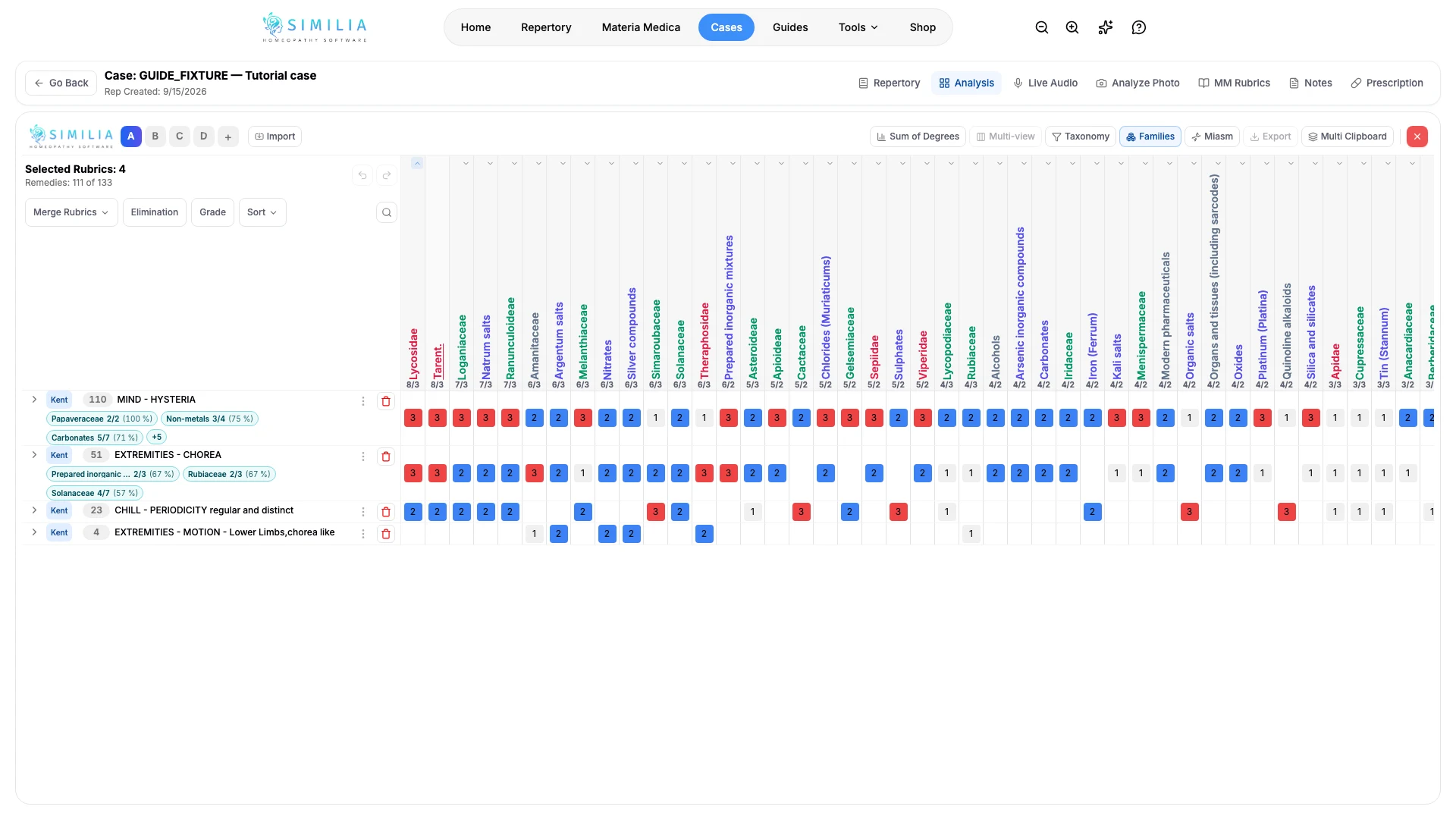
- Selectați Familii în bara de instrumente: coloanele remediilor devin câte o coloană pentru fiecare familie. Faceți clic pe antetul unei familii pentru a afișa direct coloanele membrilor săi; faceți clic din nou pentru a le restrânge.
- Deschideți săgeata de lângă Familii și activați Indicii despre familii în rubrici.
- Faceți clic pe un indiciu turcoaz, precum „Arahnide - Păianjeni 3/4 (75 %)”, pentru a vedea ce membri documentați sunt prezenți și care sunt absenți.
- În același panou, comutați taxonomia între Standard și Scholten pentru a regrupa familiile și alegeți nivelul familiei: Grup larg tratează păianjenii, șerpii sau păsările ca pe o singură familie, iar Familie taxonomică menține Lycosidae separat de Theridiidae. În Avansat, ajustați pragul majorității (50, 60 sau 70 %), numărul minim de membri prezenți și pragul minim de documentare numai dacă valorile implicite nu se potrivesc cazului.
- Sortați după grade sau după numărul de rubrici pentru a ordona familiile.
Încercați clasamentul ajustat după familie
- În același panou, activați Clasament ajustat în funcție de familie și alegeți ponderea bonusului (λ = 0.25, 0.5 sau 1). Meniul Sortare comută la Ajustat în funcție de familie, butonul Familii se evidențiază, iar antetul fiecărui remediu afișează totalul ajustat deasupra unui rând „familie +N”; faceți clic pe acel rând pentru a vedea ce rubrici au contribuit și cu cât.
- Dezactivați opțiunea sau alegeți orice alt clasament din meniul Sortare pentru a reveni exact la clasamentul obișnuit.
Ce ar trebui să vedeți
Rubricile care includ majoritatea membrilor documentați ai unei familii au un indiciu turcoaz cu raportul dintre numărul membrilor prezenți și cel al membrilor documentați, precum și procentul corespunzător. În vizualizarea pe familii, fiecare coloană reprezintă o familie, gradul său într-o rubrică este cel mai mare grad dintre membrii săi, iar antetul arată câți membri se află în fișă și câți sunt documentați în repertoriu.
Dacă ceva nu arată corect
- Dacă butonul Familii este blocat, confirmați accesul Pro.
- Dacă indiciile nu apar, deschideți Avansat și reduceți pragul sau pragul minim de documentare; familiile mici, cu mai puțini membri documentați decât pragul minim, nu sunt marcate niciodată.
- Dacă indiciile afișează „indisponibil”, este activ un filtru de autori. Raționamentul pe familii necesită lista completă de remedii din fiecare rubrică.
- Dacă un remediu lipsește din vizualizarea pe familii, acesta nu are nicio familie în taxonomia selectată; panoul Familii indică numărul celor omise.
- Exportul și Vizualizarea multiplă nu sunt disponibile cât timp este activă vizualizarea pe familii; reveniți mai întâi la coloanele remediilor.
- Clasamentul ajustat după familie este ascuns în Vizualizarea multiplă, nu se aplică atunci când vizualizarea pe familii este activă (coloanele familiilor sunt agregate) și nu este disponibil cât timp este activ un filtru de autori; acesta necesită lista completă de remedii din fiecare rubrică.